Case Study
AI Orchestration
Multi-provider LLM chat with scoped tool registries, MCP server integration, and an event-driven resume RAG pipeline.
The Problem
Most AI integrations are tightly coupled to a single provider. Swap OpenAI for Claude and you're rewriting the integration layer. Tools are hardcoded in the AI service, so adding a new capability means redeploying the whole thing.
Meanwhile, resume parsing that blocks the upload request creates a poor user experience. The user stares at a spinner while an LLM processes their document — or worse, the request times out.
The Solution
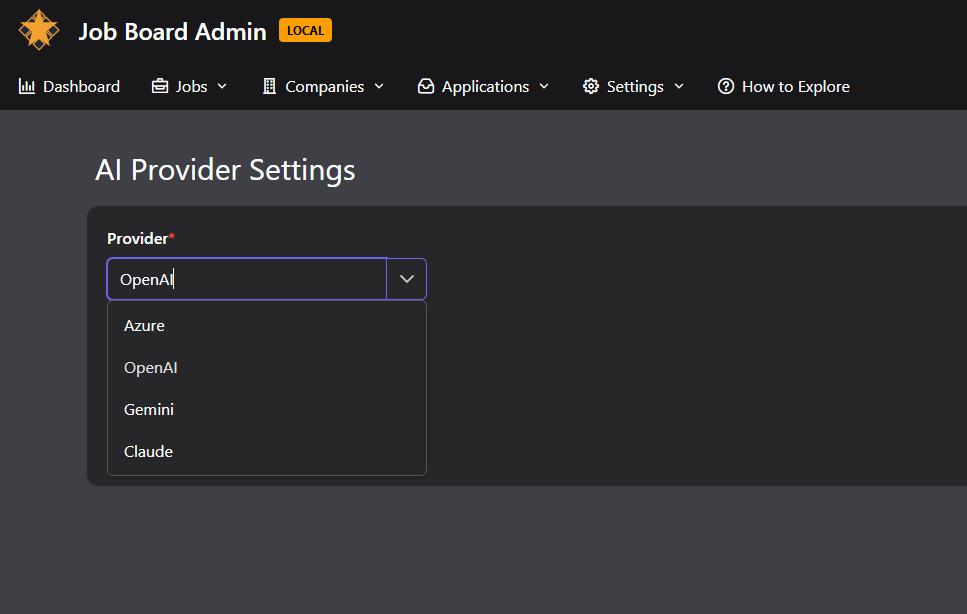
A provider-agnostic AI service built on Microsoft.Extensions.AI. The abstraction layer means switching between OpenAI, Claude, and Gemini is a configuration change, not a code change. Each provider is registered as a keyed IChatClient singleton.
Tools aren't hardcoded — they're discovered at runtime via the Model Context Protocol (MCP). The monolith and microservices each expose their own MCP server. The AI service connects to whichever one matches the user's current session mode, discovering available tools dynamically.
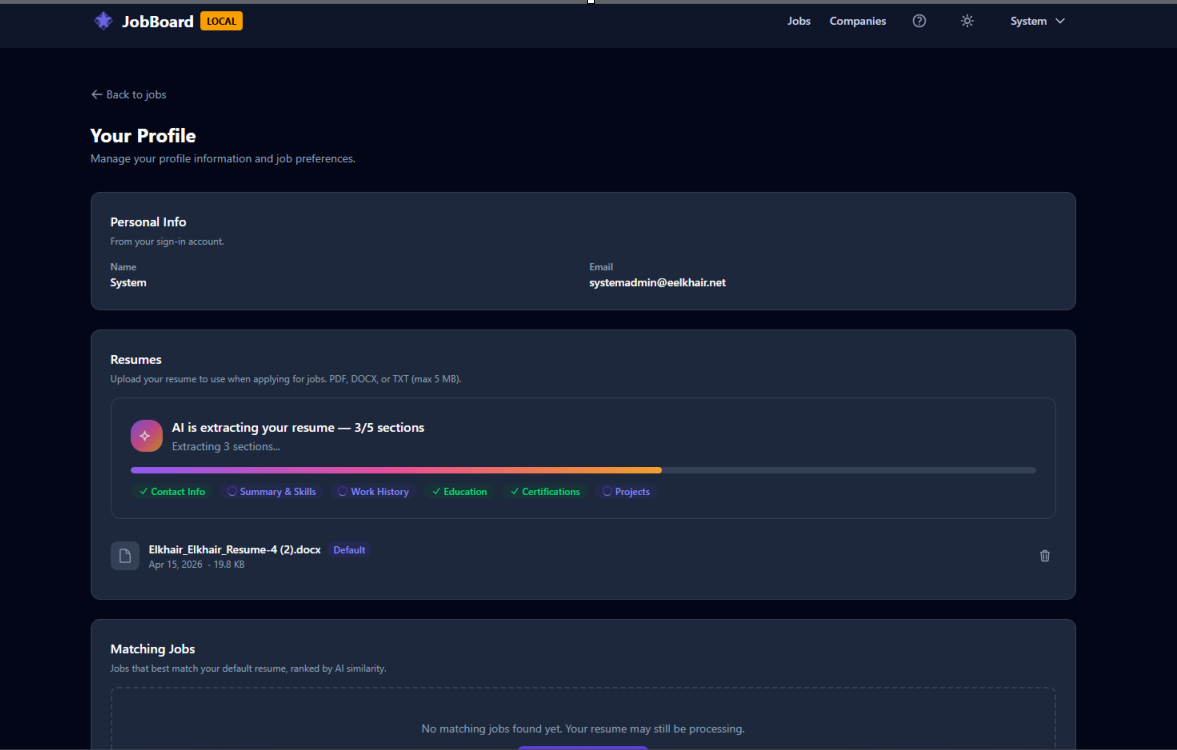
Resume processing is fully async. Upload triggers an event, a background handler downloads and parses the resume, generates embeddings, and stores them in pgvector. The user gets real-time progress updates via SignalR.
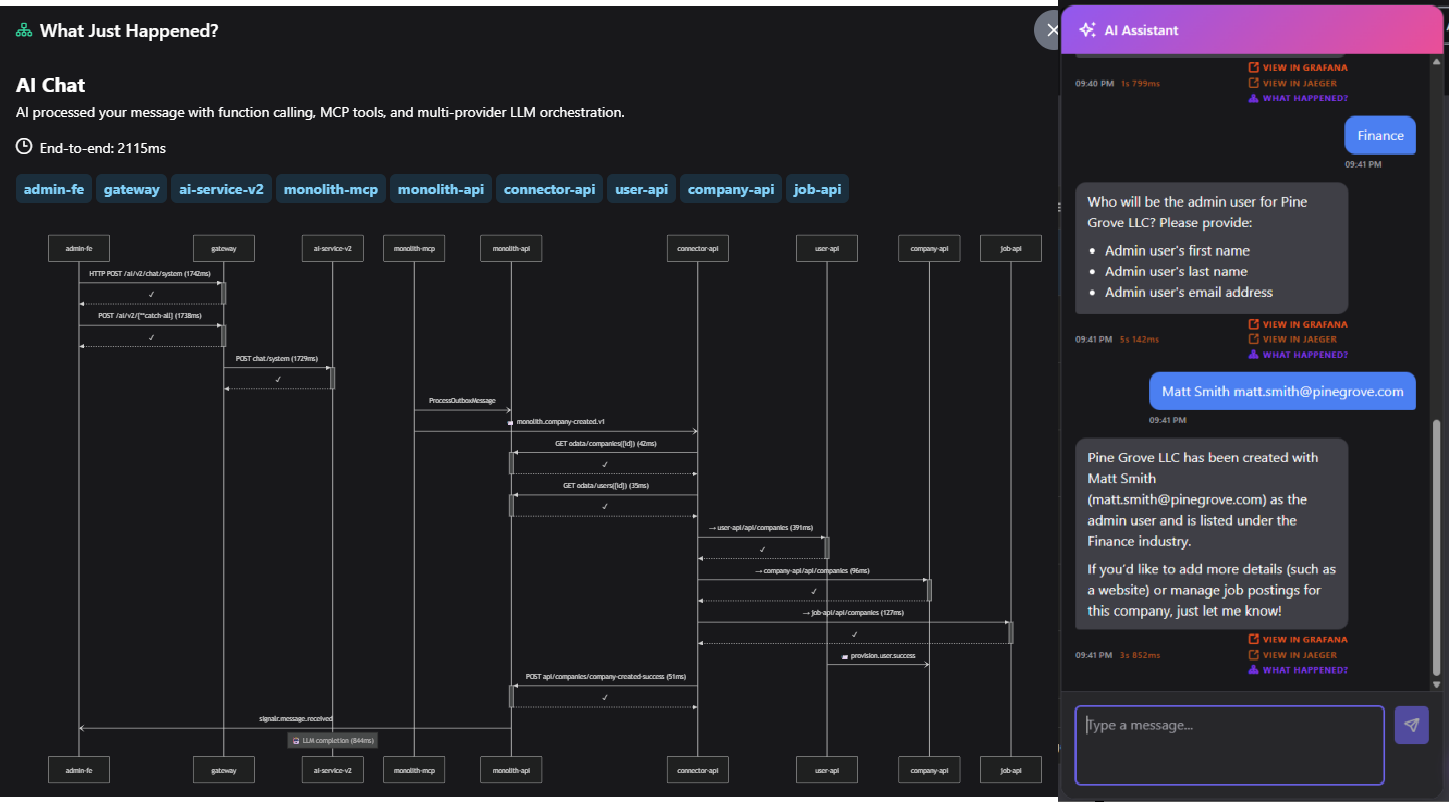
Architecture
The AI service uses a scoped tool registry pattern. Four chat scopes (SystemAdmin, Admin, CompanyAdmin, Public) each get their own tool set. A ChatOptionsFactory resolves the correct registry based on the authenticated user's role and reads the x-mode header to select the right MCP topology.
The resume pipeline is a three-stage event-driven flow: ResumeUploadedV1Event triggers download and parsing, ResumeParsedV1Event triggers embedding generation, and ResumeDeletedV1Event triggers cleanup. Each stage communicates through Dapr pub/sub on RabbitMQ.
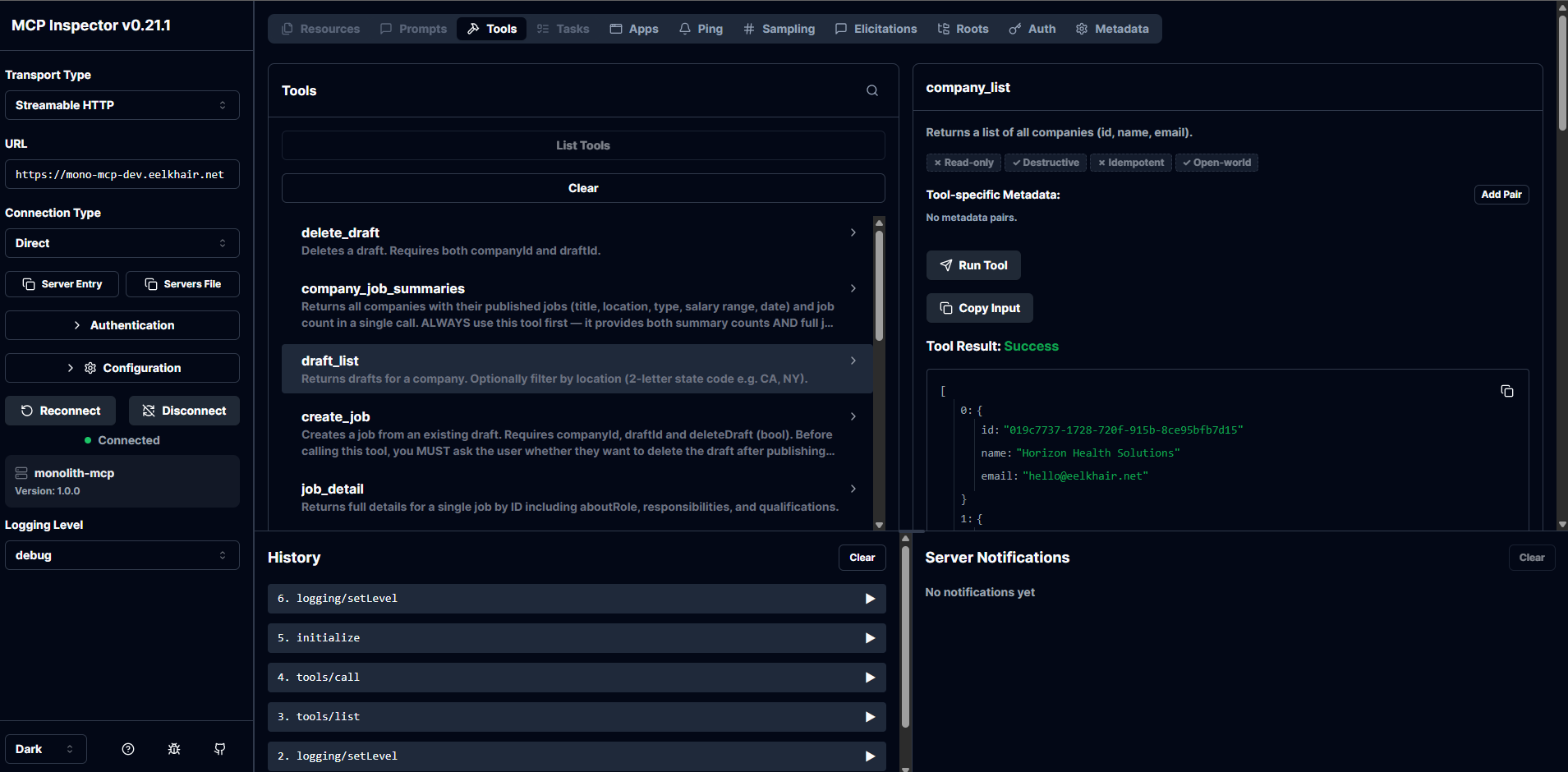
What You See
In the admin app, open the AI chat and ask it to create a company. Watch the conversation — you'll see the model decide which tool to call, the function invocation, and the result. Switch between monolith and microservices mode and ask the same question: the AI discovers different tools from different MCP servers.
In the public app, upload a resume. A progress indicator updates in real-time as the system downloads, parses, and embeds the document. Then ask the AI for job recommendations — it queries the pgvector embeddings to find semantic matches.
Behind the Scenes
The FunctionInvokingChatClient from Microsoft.Extensions.AI handles the tool-calling loop automatically. When the model returns a tool call, the middleware invokes the matching AIFunction, feeds the result back, and lets the model decide whether to call another tool or respond to the user.
MCP tool discovery happens through McpToolProvider, which connects to the backend MCP servers via SSE transport. The provider resolves tools at startup and caches them. When the user's session mode changes, a different MCP topology is selected.
JWT tokens are forwarded through AsyncLocal storage so that tool calls from the AI service authenticate against the backend APIs with the original user's identity. This means authorization rules apply consistently — a CompanyAdmin can only create jobs in their own company, even through the AI chat.
Key Decisions
MCP servers over in-process tools
Why: In-process tools couple the AI service to domain logic. MCP servers let each backend expose its own tools independently. Adding a tool to the monolith doesn't require redeploying the AI service.
Alternative: Shared NuGet package with tool definitions. Simpler but creates tight coupling.
Microsoft.Extensions.AI over direct SDK calls
Why: The abstraction lets us swap providers without changing application code. The decorator pipeline applies uniformly regardless of which provider is active.
Alternative: Semantic Kernel. More opinionated, heavier dependency.
pgvector over a dedicated vector database
Why: PostgreSQL was already in the stack. Adding the pgvector extension avoids introducing another database to operate. For portfolio scale, it performs well.
Alternative: Pinecone, Qdrant, or Weaviate. Better at scale but adds operational complexity.
Three chat scopes with policy-based auth
Why: Different user roles need different capabilities. Scoping at the chat level prevents privilege escalation through the AI.
Alternative: Single chat endpoint with runtime permission checks per tool. Simpler routing but harder to audit.
Tradeoffs & Lessons Learned
- MCP adds a network hop per tool call: Each tool invocation goes from AI service to MCP server to backend API and back. The latency is acceptable (tens of milliseconds) but visible in traces.
- pgvector limits: Cosine similarity search with 1536-dimension embeddings works well up to roughly a million vectors. Beyond that, you'd need approximate nearest neighbor indexes or a dedicated vector database.
- Tool descriptions matter enormously: The LLM selects tools based on their descriptions. Vague descriptions cause N+1 tool calls. We saw 20x token savings by making descriptions explicit.
- Redis conversation window: Chat history is stored in Redis and truncated at 40 messages. A smarter approach would summarize older messages instead of dropping them.